Tuples
What Are Tuples?
- Tuples are used to store multiple items in a single variable. They are one of Python's built-in data types, alongside lists, sets, and dictionaries.
Creating a Tuple:
Tuples are created using round brackets
(). python
mytuple = ("apple", "banana", "cherry") print(mytuple)Output:
('apple', 'banana', 'cherry')
Properties of Tuples:
- Ordered: Items have a defined order that will not change.
- Unchangeable: Tuples are immutable; you cannot change, add, or remove items after the tuple is created.
- Allow Duplicates: Tuples can have items with the same value.
- Indexed: Items can be accessed using their index, starting from 0.
Examples:
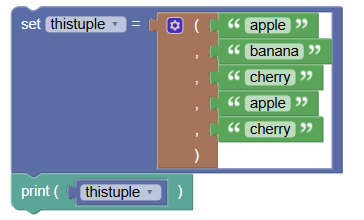
Tuples with Duplicates:
 python
thistuple = ("apple", "banana", "cherry", "apple", "cherry") print(thistuple)Output:
('apple', 'banana', 'cherry', 'apple', 'cherry')
- Tuple Length:
Use the
len()function to find the number of items. python
thistuple = ("apple", "banana", "cherry") print(len(thistuple))Output:
3
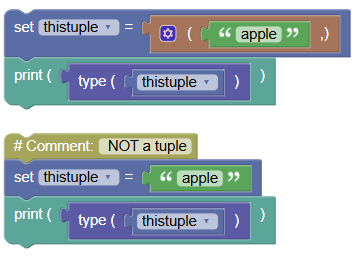
- Single Item Tuple:
Add a comma after the item to create a tuple with one item.
 python
thistuple = ("apple",) print(type(thistuple)) # NOT a tuple thistuple = ("apple") print(type(thistuple))- Output:
<class 'tuple'> Output:
<class 'str'>
- Output:
Accessing Items:
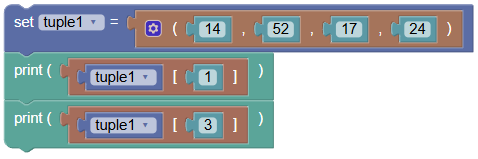
Access items using their index:
 python
tuple1 = (14, 52, 17, 24) print(tuple1[1]) print(tuple1[3])- Output:
52 Output:
24
- Output:
Iterating Over Items:
Use a
forloop to iterate over items in a tuple: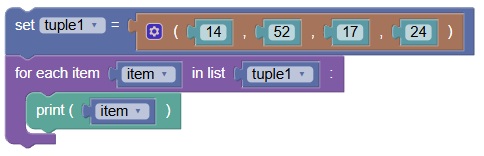 python
tuple1 = (14, 52, 17, 24) for item in tuple1: print(item)Output:
14
52
17
24
Tuple Methods:
- Tuples have two methods:
count(): Returns the number of times a specified value occurs in a tuple.index(): Searches the tuple for a specified value and returns the position of where it was found.
Exercises:
- Create and Print a Tuple:
Create a tuple of your favorite fruits and print it.
 python
fruits = ("apple", "banana", "cherry") print(fruits)Output:
('apple', 'banana', 'cherry')
- Access and Print Items:
Access and print the first and last items of the tuple.
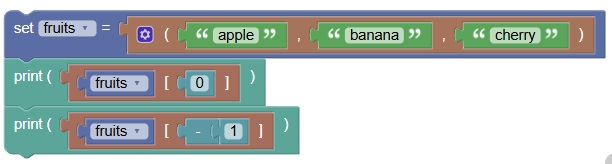 python
fruits = ("apple", "banana", "cherry") print(fruits[0]) print(fruits[-1])- Output:
apple Output:
cherry
- Output:
- Iterate Over a Tuple:
Write a program to iterate over a tuple and print each item.
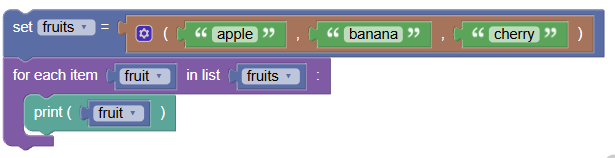 python
fruits = ("apple", "banana", "cherry") for fruit in fruits: print(fruit)Output:
apple
banana
cherry
Summary:
- Tuples are ordered and immutable collections that can store multiple items in a single variable. They allow duplicate values and can contain items of different data types. Practice creating, accessing, and iterating over tuples to understand their properties and uses!