Slicing Strings
What You'll Learn: In this tutorial, you'll discover how to slice strings in Python. Slicing allows you to grab specific parts of a string, just like cutting out pieces from a piece of cake!
What is Slicing?
Slicing is a way to get a range of characters from a string. You specify the start and end positions to return a part of the string.
Basic Slicing Syntax
To slice a string, you use the syntax string[start:end].
Example Code:
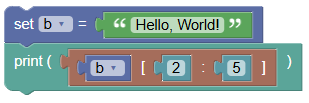
b = "Hello, World!"
print(b[2:5])
What's Happening Here?
bis your string.b[2:5]gets the characters from position 2 to 5 (not included).
Output: llo
Slice From the Start
If you leave out the start index, the slice begins from the first character.
Example Code:
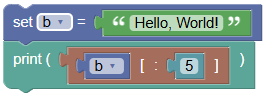
b = "Hello, World!"
print(b[:5])
Output: Hello
Slice To the End
If you leave out the end index, the slice goes to the end of the string.
Example Code:
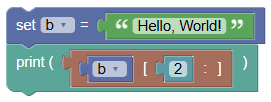
b = "Hello, World!"
print(b[2:])
Output: llo, World!
Negative Indexing
Negative indexes allow you to slice from the end of the string.
Example Code:
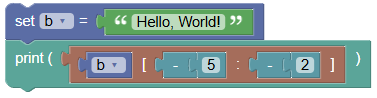
b = "Hello, World!"
print(b[-5:-2])
Output: orl
Try It Yourself: Fun Exercises
- Slice Your Name:
- Create a string with your name.
- Use slicing to get the first three characters.
- Hidden Message:
- Write a secret message using a long string.
- Use slicing to reveal the hidden parts of your message.
Summary:
In this Python tutorial, we learned how to use slicing to get specific parts of a string. Slicing is a powerful tool that allows you to grab just the parts you need. We covered the basic syntax, how to slice from the start or to the end, and how to use negative indexes. Keep experimenting and have fun with slicing strings!