Escape Characters
What You'll Learn: In this tutorial, you'll discover how to use escape characters in Python to handle special characters in strings. Think of it like a secret code to include characters that are usually not allowed!
What is an Escape Character?
An escape character is a backslash \ followed by a character you want to insert into a string. It's useful for including characters that would otherwise cause errors.
Using Escape Characters
For example, you can't normally use double quotes inside a string that is surrounded by double quotes.
Example Code:
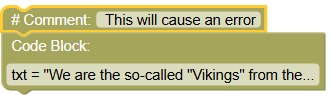
# This will cause an error
txt = "We are the so-called "Vikings" from the north."
To fix this, use an escape character \".
Example Code:
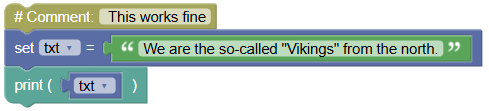
# This works fine
txt = "We are the so-called \"Vikings\" from the north."
print(txt)
Output: We are the so-called "Vikings" from the north.
Common Escape Characters
Here are some other escape characters used in Python:
| Code | Result |
|---|---|
| \' | Single Quote |
| \\ | Backslash |
| \n | New Line |
| \r | Carriage Return |
| \t | Tab |
| \b | Backspace |
| \f | Form Feed |
| \ooo | Octal value |
| \xhh | Hex value |
Try It Yourself: Fun Exercises
- Quotation Marks:
- Create a string that includes both single and double quotes using escape characters.
- Print it out to see the result.
- New Lines and Tabs:
- Create a string that uses
\nfor new lines and\tfor tabs to format the text. - Print the formatted string.
- Create a string that uses
Summary:
In this Python tutorial, we learned how to use escape characters to handle special characters in strings. Escape characters allow you to include characters like quotes, new lines, tabs, and more in your strings without causing errors. This makes it easier to work with and format text in your programs. Keep experimenting and have fun with escape characters in Python!