String Length
What You'll Learn: In this tutorial, you'll discover how to find the length of a string using the len() function. It's like counting how many beads are on a string necklace!
What is the Length of a String?
The length of a string is the number of characters in it. This includes letters, numbers, spaces, and any other characters.
Using the len() Function
To find the length of a string in Python, use the len() function. It's super easy!
Syntax:
len(mystring)
Here, mystring is the string whose length you want to find.
Examples
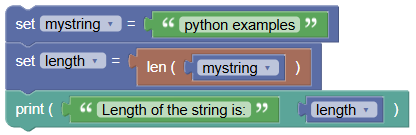
Finding the Length of a Given String
- Let's take a string and find its length using the
len()function.
Example Code:
 python
mystring = 'python examples' length = len(mystring) print('Length of the string is:', length)Output:
Length of the string is: 15This means there are 15 characters in the string "python examples", including spaces.
- Let's take a string and find its length using the
Finding the Length of an Empty String
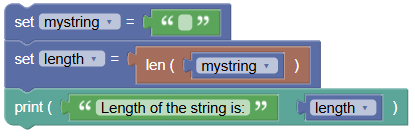
- If you try to find the length of an empty string (a string with no characters), it returns zero.
Example Code:
 python
mystring = '' length = len(mystring) print('Length of the string is:', length)Output:
Length of the string is: 0
Try It Yourself: Fun Exercises
- Count Your Name's Letters:
- Create a string with your name.
- Use the
len()function to find out how many letters are in your name.
- Count the Words:
- Write a short sentence.
- Use the
len()function to find out the total number of characters, including spaces.
Summary:
In this Python tutorial, we learned how to find the length of a string using the len() function. This function returns the number of characters in the string, making it a handy tool for counting and analyzing text. We covered examples with a regular string and an empty string. Keep experimenting and have fun with strings in Python!