For Loop
Introduction:
- A for loop in Python can be used to iterate over a set of statements once for each item in a sequence or collection. This sequence could be a range, list, tuple, dictionary, set, or a string.
Syntax:
python
for item in iterable:
    statement(s)
iterablecould be a sequence or collection, anditemis the variable that holds the value of the current element in the loop.
Examples:
- For Loop with Range:
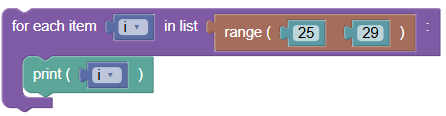
Iterating over a range of numbers.
 python
for i in range(25, 29): print(i)Output:
25
26
27
28
- For Loop with String:
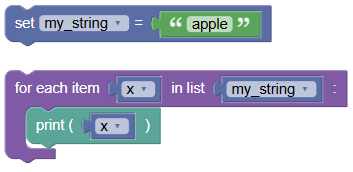
Iterating over the characters of a string.
 python
my_string = 'apple' for x in my_string: print(x)Output:
a
p
p
l
e
- Using
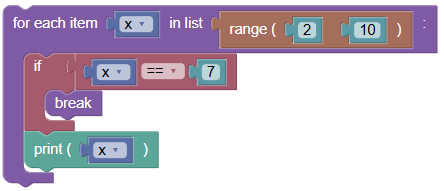
breakin For Loop:Breaking the loop when a specific condition is met.
 python
for x in range(2, 10): if x == 7: break print(x)Output:
2
3
4
5
6
- Using
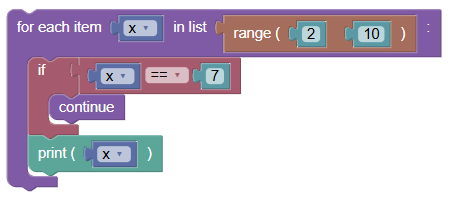
continuein For Loop:Skipping the current iteration when a specific condition is met.
 python
for x in range(2, 10): if x == 7: continue print(x)Output:
2
3
4
5
6
8
9
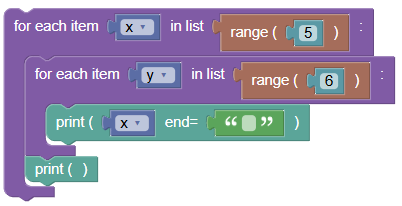
- Nested For Loop:
Writing a for loop inside another for loop.
 python
for x in range(5): for y in range(6): print(x, end=' ') print()Output:
0 0 0 0 0 0
1 1 1 1 1 1
2 2 2 2 2 2
3 3 3 3 3 3
4 4 4 4 4 4
Exercises:
- Use
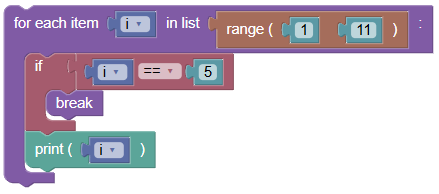
breakin a Loop:Use a for loop to print numbers from 1 to 10. Break the loop if the number is 5.
 python
for i in range(1, 11): if i == 5: break print(i)
- Use
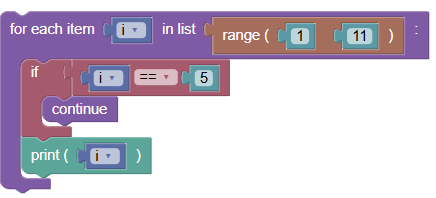
continuein a Loop:Use a for loop to print numbers from 1 to 10. Skip the number 5.
 python
for i in range(1, 11): if i == 5: continue print(i)
Summary:
- In this tutorial, we learned how to use Python For Loop with different collections and control statements like
break,continue, andelseblocks. Practice these examples to become proficient in using for loops in your Python programs!