Basic Movement Commands
Introduction:
- Welcome to BlockPyArt, an exciting way to learn programming by drawing shapes and patterns on a screen. This tutorial introduces the basic movement commands that will help you control a block to create different patterns. Remember: Always use the “start” block to activate the BlockPyArt console. If you do not start with the start block, you will encounter an error and the commands will not work properly.

Basic Movement Commands
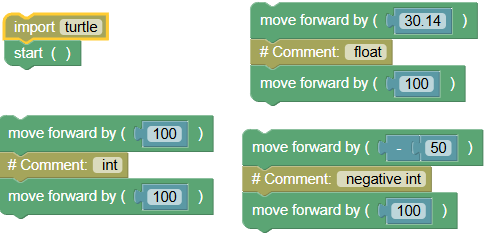
- forward(distance):
- Purpose: Moves the block forward by the specified distance in the direction it is facing.
Example:
 python
import turtle turtle.mainloop() turtle.forward(100) # int turtle.forward(100) turtle.forward(30.14) # float turtle.forward(100) turtle.forward(-50) # negative int turtle.forward(100)Exercise: Move the block forward by 50, 200.5, and -30 pixels respectively.
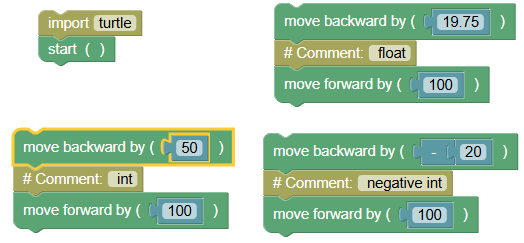
- backward(distance):
- Purpose: Moves the block backward by the specified distance.
Example:
 python
import turtle turtle.mainloop() turtle.backward(50) # int turtle.forward(100) turtle.backward(19.75) # float turtle.forward(100) turtle.backward(-20) # negative int turtle.forward(100)Exercise: Move the block backward by 30, 52.25, and -15 pixels respectively.
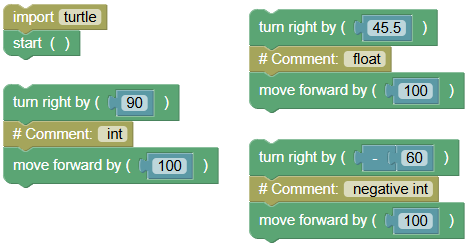
- right(angle):
- Purpose: Rotates the block clockwise by the specified angle.
Example:
 python
import turtle turtle.mainloop() turtle.right(90) # int turtle.forward(100) turtle.right(45.5) # float turtle.forward(100) turtle.right(-60) # negative int turtle.forward(100)Exercise: Rotate the block to the right by 90, 30.75, and -45 degrees respectively.
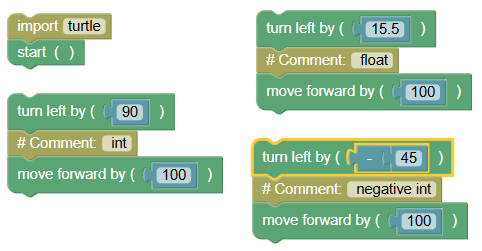
- left(angle):
- Purpose: Rotates the block counterclockwise by the specified angle.
Example:
 python
import turtle turtle.mainloop() turtle.left(90) # int turtle.forward(100) turtle.left(15.5) # float turtle.forward(100) turtle.left(-45) # negative int turtle.forward(100)Exercise: Rotate the block to the left by 60, 20.25, and -30 degrees respectively.
- goto(x, y):
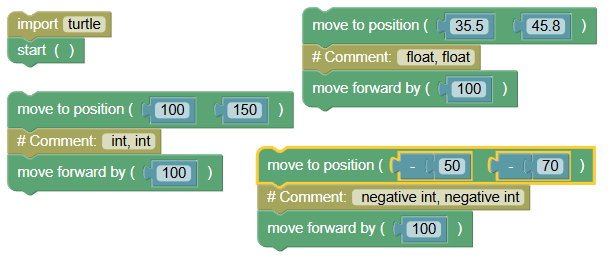
- Purpose: Moves the block to the specified coordinates (x, y).
Example:
 python
import turtle turtle.mainloop() turtle.goto(100, 150) # int, int turtle.forward(100) turtle.goto(35.5, 45.8) # float, float turtle.forward(100) turtle.goto(-50, -70) # negative int, negative int turtle.forward(100)Exercise: Move the block to the coordinates (20, 30), (21.25, 72.5), and (-10, -15).
- setx(x):
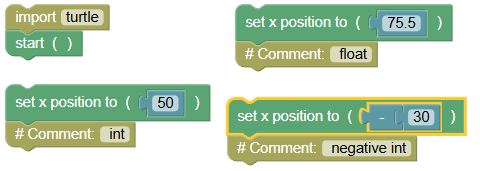
- Purpose: Sets the block's x-coordinate.
Example:
 python
import turtle turtle.mainloop() turtle.setx(50) # int turtle.setx(75.5) # float turtle.setx(-30) # negative intExercise: Set the block's x-coordinate to 25, 27.75, and -20.
- sety(y):
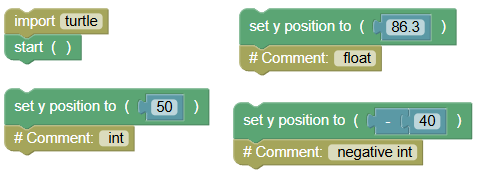
- Purpose: Sets the block's y-coordinate.
Example:
 python
import turtle turtle.mainloop() turtle.sety(50) # int turtle.sety(86.3) # float turtle.sety(-40) # negative intExercise: Set the block's y-coordinate to 35, 17.25, and -25.
- setheading(angle):
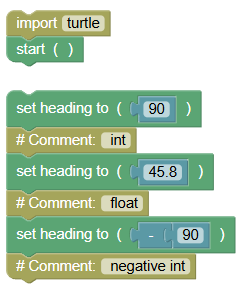
- Purpose: Sets the block's heading to the specified angle.
Example:
 python
import turtle turtle.mainloop() turtle.setheading(90) # int turtle.setheading(45.8) # float turtle.setheading(-90) # negative intExercise: Set the block's heading to 180, 60.5, and -120 degrees.
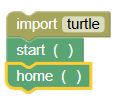
- home():
- Purpose: Moves the block to its home position (0, 0) and sets its heading to the default direction (east).
Example:
 python
import turtle turtle.mainloop() turtle.home()Exercise: Move the block to the home position.
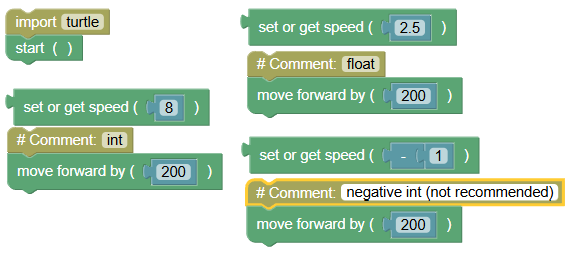
- speed(speed):
- Purpose: Sets the speed of the block's movement.
Example:
 python
import turtle turtle.mainloop() turtle.speed(8) # int turtle.forward(200) turtle.speed(2.5) # float turtle.forward(200) turtle.speed(-1) # negative int (not recommended) turtle.forward(200)
Exercises
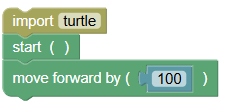
- Draw a Line:
Write a program to move the block forward by 100 pixels to draw a straight line.
 python
import turtle turtle.mainloop() turtle.forward(100)
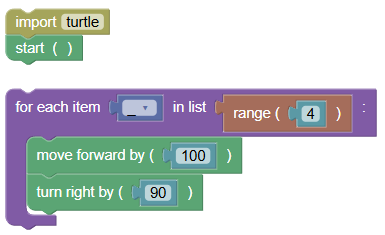
- Draw a Square:
Write a program to draw a square using the movement commands.
 python
import turtle turtle.mainloop() for _ in range(4): turtle.forward(100) turtle.right(90)
- Draw a Triangle:
Write a program to draw an equilateral triangle using the movement commands.
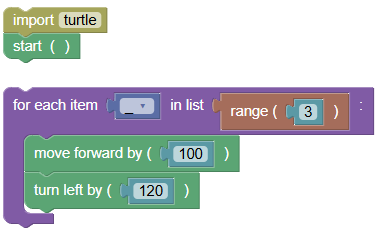 python
import turtle turtle.mainloop() for _ in range(3): turtle.forward(100) turtle.left(120)
- Move to Coordinates and Set Speed:
Write a program to move the block to (50, 75) and set the speed to 3.
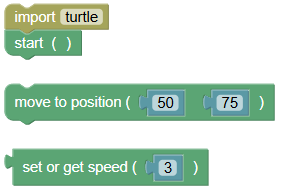 python
import turtle turtle.mainloop() turtle.goto(50, 75) turtle.speed(3)
Summary:
- In this tutorial, we learned the basic movement commands in BlockPyArt:
forward(),backward(),right(),left(),goto(),setx(),sety(),setheading(),home(), andspeed(). Remember to always use the start block to activate the BlockPyArt console. If you cannot start using the BlockPyArt blocks, there will be an error. Practice these commands and exercises to get comfortable with moving the block in BlockPyArt!