Input Operations
What Is the input() Function?
- The
input()function in Python allows you to get input from the user. This is useful for interactive programs where the user provides information while the program is running.
How to Use It:
The basic way to use the
input()function is:pythonvariable_name = input("Your prompt message here")promptis a message that tells the user what to input.- The
input()function returns the user’s input as a string.
Examples and Exercises:
- Reading a String Value from the User:
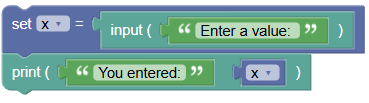
Let's read a string input from the user and print it:
 python
x = input('Enter a value: ') print('You entered:', x)When the user types
helloand presses Enter:Enter a value: hello You entered: hello
- Reading a Number Using
input():By default, the
input()function returns a string. You can convert this string to a number usingint(),float(), orcomplex().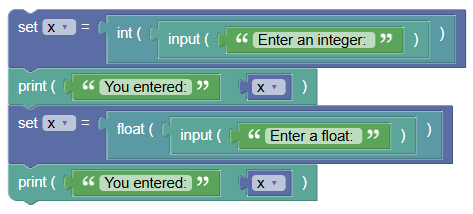 python
x = int(input('Enter an integer: ')) print('You entered:', x) x = float(input('Enter a float: ')) print('You entered:', x)When the user types
26and69.54:Enter an integer: 26 You entered: 26 Enter a float: 69.54 You entered: 69.54
- Using
input()Without a Prompt:You can also use
input()without providing a prompt message: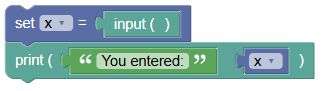 python
x = input() print('You entered:', x)When the user types
nature:nature You entered: nature
Summary:
- The
input()function is a powerful tool for getting user input in your programs. It reads input as a string, but you can convert it to other data types as needed. Practice usinginput()to make your programs interactive and user-friendly!