Create a list of strings
What You'll Learn: In this tutorial, you'll discover how to create a list of strings in Python. A list is like a collection where you can store multiple pieces of text (strings).
Method 1: Create an Empty List and Add String Elements
- Create an Empty List
You can start with an empty list and add strings to it one by one using the
append()method.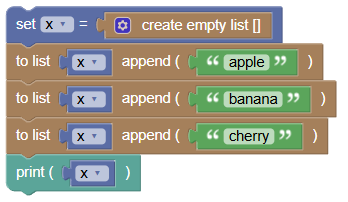
x = []
x.append('apple')
x.append('banana')
x.append('cherry')
print(x)
What's Happening Here?
xis an empty list.- We use
append()to add 'apple', 'banana', and 'cherry' to the list.
Output: ['apple', 'banana', 'cherry']
Method 2: Initialize List with String Elements
- Initialize a List with String Elements
You can also create a list with initial string elements directly.

x = ['apple', 'banana', 'cherry']
print(x)
What's Happening Here?
xis a list that already contains 'apple', 'banana', and 'cherry'.
Output: ['apple', 'banana', 'cherry']
Try It Yourself: Fun Exercises
- Favorite Foods:
- Create a list with your favorite foods.
- Use the
append()method to add more foods to your list.
- Top Songs:
- Create a list with the names of your favorite songs.
- Initialize the list with at least three song titles.
Summary:
In this Python tutorial, we learned how to create a list of strings using two methods: starting with an empty list and adding elements, and initializing the list with elements directly. Lists are a great way to organize and store multiple pieces of text. Keep experimenting and have fun with lists in Python!