Print to Console Output
What is Console Output?
Console output is how your program communicates with you. When you run your program, it can display messages on the screen, which we call "printing to the console".
Why is it Important?
Printing to the console is a basic but essential skill because it allows you to see the results of your code, debug your programs, and interact with users.
What Is the print() Function?
- The
print()function in Python is used to display text or numbers on the screen.
1. Syntax of print():
print(*objects, sep=' ', end='\n', file=None, flush=False)
*objects: Items to print (like words or numbers).sep: Separator between items (default is space).end: What comes at the end (default is a new line).file: Where to send the output (default is the screen).flush: Whether to flush the output (default is False).
2. Examples to Practice:
Print Text:
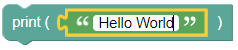
print('Hello World')- Output:
Hello World
- Output:
Print a Number:
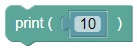
print(10)- Output:
10
- Output:
Print with a Custom Separator:

print('pi is', 3.14, sep=' : ')Output:
pi is : 3.14
Print with a Custom End:
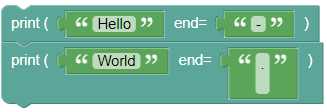
print('Hello', end='-')
print('World', end='.\n')
Output:
Hello-World.
3. Print Without a New Line:
To print without moving to a new line, use:
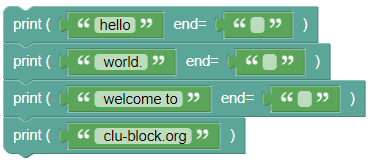
print('hello', end='')
print(' world.', end='')
print(' welcome to', end='')
print(' clu-block.org')
Output:
hello world. welcome to clu-block.org
Replace the End Character:
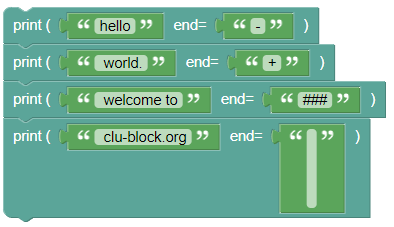
print('hello', end='-')
print(' world.', end='+')
print(' welcome to', end='###')
print(' clu-block.org', end='\n\n\n')
Output:
hello- world.+ welcome to### clu-block.org
4. Printing Multiple Items
Objective: Learn how to print multiple items on one line.
Use the comma "," operator to combine multiple items into one print statement, usually from code, it is used to simplify the combination of multiple variables and text.
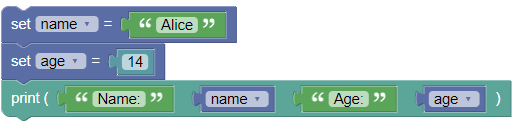
name = "Alice"
age = 14
print("Name:", name, "Age:", age)
Output:
Name: Alice Age: 14
Summary:
- The
print()function is a key tool in Python for showing text and numbers on the screen. Try out the examples above to see how it works!