Removing Array Items
Introduction:
- In Python, you can remove elements from an array (or list) using methods like
pop()andremove(). These methods help manage and manipulate the contents of arrays.
Using pop() Method:
- The
pop()method removes an element from the array at the specified index. Example: Delete the second element of the
carsarray: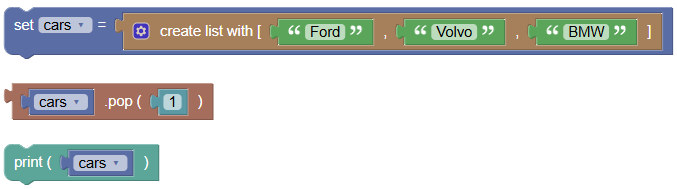 python
cars = ["Ford", "Volvo", "BMW"] cars.pop(1) print(cars)Output:
['Ford', 'BMW']
Using remove() Method:
- The
remove()method removes the first occurrence of the specified value from the array. Example: Delete the element that has the value "Volvo":
 python
cars = ["Ford", "Volvo", "BMW"] cars.remove("Volvo") print(cars)Output:
['Ford', 'BMW']
Exercises:
- Remove a Number from a List:
Write a program to remove the number 3 from a list of numbers using the
remove()method.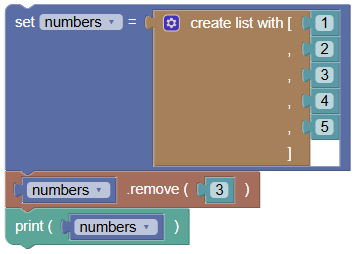 python
numbers = [1, 2, 3, 4, 5] numbers.remove(3) print(numbers)Output:
[1, 2, 4, 5]
- Remove the Last Item Using
pop():Write a program to remove the last item from a list of fruits using the
pop()method without any arguments.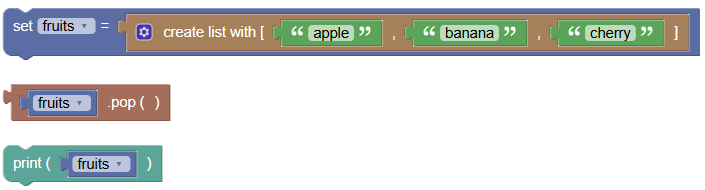 python
fruits = ["apple", "banana", "cherry"] fruits.pop() print(fruits)Output:
['apple', 'banana']
Summary:
- In this tutorial, we learned how to use the
pop()andremove()methods to delete elements from an array. These methods are essential for managing the contents of arrays in Python. Practice using these methods to get comfortable with removing elements from arrays!