Output Variables
Introduction:
- The Python
print()function is commonly used to output variables. You can output single or multiple variables, and even combine strings and numbers using different methods.
Examples:
- Output a Single Variable:
You can use the
print()function to output a single variable:x = "Python is awesome" print(x)
- Output Multiple Variables with Comma:
Use commas to output multiple variables in the
print()function: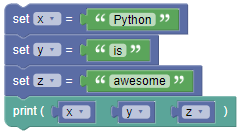
x = "Python"
y = "is"
z = "awesome"
print(x, y, z)
Output:
Python is awesome
- Output Multiple Variables with + Operator:
You can also use the
+operator to concatenate strings and output multiple variables: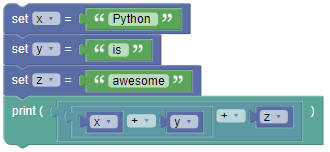
x = "Python "
y = "is "
z = "awesome"
print(x + y + z)
Output:
Python is awesome
- Note: Ensure you include spaces where necessary, as shown in the example above.
- Using + Operator with Numbers:
The
+operator works as a mathematical operator for numbers: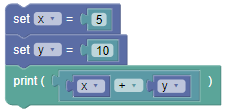
x = 5
y = 10
print(x + y)
Output:
15
- Combining Strings and Numbers with Comma:
To combine a string and a number in the
print()function, separate them with commas: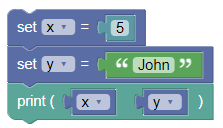
x = 5
y = "John"
print(x, y)
Output:
5 John
Summary:
- In this tutorial, we learned how to use the
print()function to output variables in Python. We explored different methods to combine and display variables, whether they are strings or numbers. Practice using these techniques to get comfortable with outputting variables in Python!